


We’re often asked about whether it’s possible to hide courses from different sets of users in the course listings page. And the answer is: Yes.
In Totara Learn, each course’s “visibility” to other users can be set based on whether the user is a member of a particular Audience.
Audiences are defined by the site administrator. The site administrator can select specific users by name to be part of an audience or can define a rule/rules which automatically add a user to an audience based on satisfying conditions eg. completing or course, allocation of a position within a company.
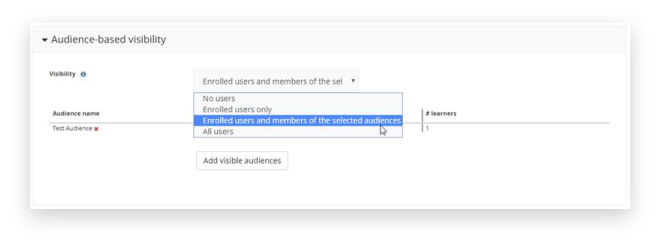
Once the audience has been created, it is then simply a case of going into the settings of a course and configuring the Audience-based visibility:

And then selecting “Add Visible Audiences”:

*It’s important to note that Audience-based visibility settings have to be enabled first within the following location:
Site administration > System information > Advanced features
Enabling this setting will change the visibility of all courses, programs and certifications across the whole site. Existing visibility settings will no longer apply and certifications that were currently hidden may become visible.
Can’t get enough Totara Learn knowledge?
Our platform experts have a wealth of experience to help you and your team with specific training requirements.
{{cta(‘3e21cb33-5d2d-4b0b-8251-4d3c564afba3′,’justifycenter’)}}
Hubken Group provide learning solutions that help businesses automate compliance training, speed up employee inductions, and scale-up face-to-face training programs by bringing them online.