

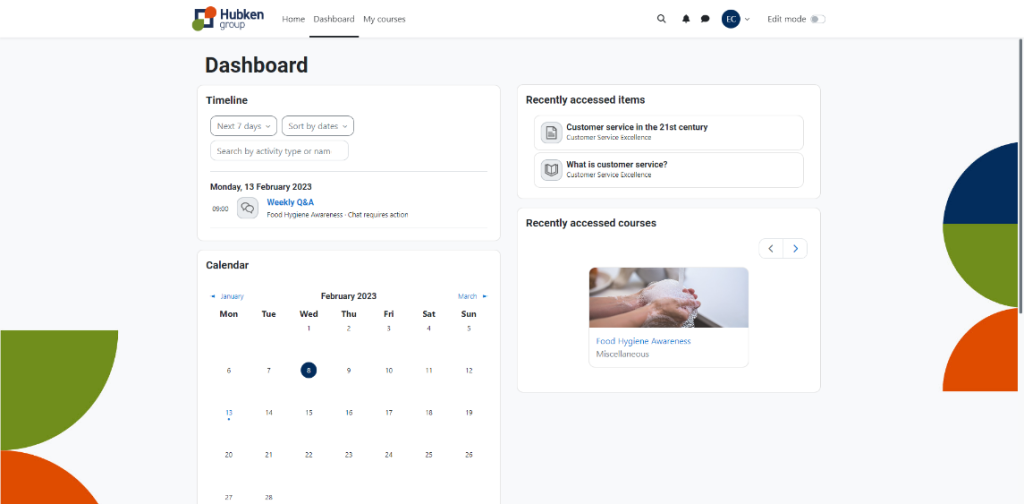

Creating a modern, intuitive, and engaging learning experience is at the heart of any successful Moodle site in 2025. With continuous improvements to the platform and new tools available to enhance usability, it’s never been easier to elevate the user experience for both learners and administrators.
A key part of that process involves modernising your Moodle installation to enhance the user experience. This typically means refreshing the visual design with a responsive theme or a custom build, streamlining navigation, optimising site performance, and making the most of Moodle’s latest features. The goal? A clean, intuitive interface that supports faster access to learning and easier content management.
At Hubken, we not only support Moodle’s latest features, we’ve also developed exclusive enhancements designed to deliver a cleaner, faster, and more user-friendly LMS experience.
Here’s a breakdown of some of the most impactful innovations and feature upgrades available right now.
TLDR: Moodle functionality breakdown
-
Modernise your Moodle site with a responsive or custom theme for a fresh, user-friendly design.
-
Streamline navigation and optimise site performance to enhance the learner and admin experience.
-
Leverage new Moodle features like advanced reporting and improved user tours.
-
Take advantage of Hubken-exclusive enhancements for cleaner navigation and powerful course formats.
-
Planning a Moodle upgrade or migration? Hubken offers expert migration support to ensure a smooth, hassle-free transition.
Hubken exclusive innovations
We’ve developed a series of exclusive enhancements tailored to help our clients get the most out of Moodle, improving both the look and feel of the platform while enhancing usability across the board.
Moodle enhanced reporting
Moodle’s native Report Builder is powerful, but our enhanced reporting solution takes it to the next level. Designed exclusively for Hubken clients, this tool delivers advanced customisation, deeper insights, and intuitive dashboards that make reporting faster, clearer, and more actionable.
With our enhanced reporting features, you can:
- Build in-depth, site-wide reports in just a few clicks
-
Visualise data for better decision-making
-
Simplify compliance and performance tracking
Find out more about our exclusive Moodle reporting solution by visiting our enhanced reporting page.
A new theme
A completely modernised, clean version of our custom theme encompasses all the innovations in design that come with Moodle and so much more. For a detailed overview of the new branding, see our article here: Moodle Hubken Branding introduction: Hubken Group

A new course format
The Hubken exclusive Topics Extended course format has been overhauled and enhanced to take advantage of the navigation improvements in Moodle.
We have created an exiting new design which we hope you will love. Take a look at our introduction to the new format here: Moodle Hubken Topics Extended introduction: Hubken Group

New and enhanced features
Overview block
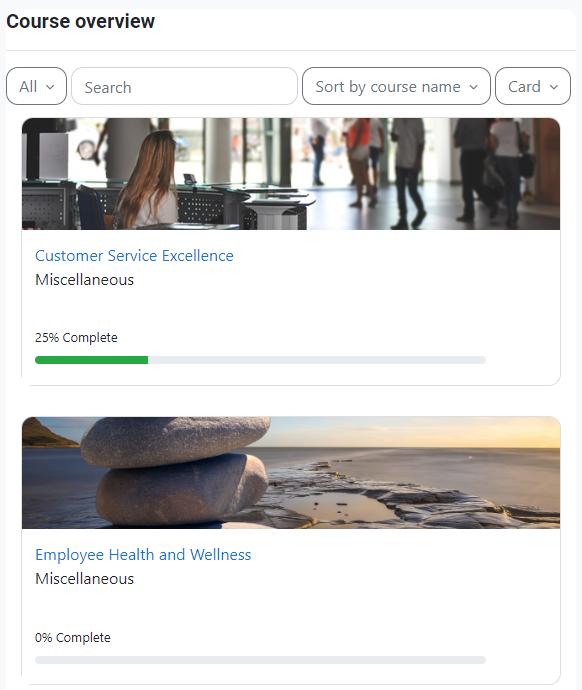
The overview block provides a view of the student’s enrolled courses and their progress in the courses. This block can be added to the student’s dashboard. The block is searchable and filterable.
Timeline block
The timeline block which tracks upcoming deadlines in courses now appears by default on dashboards.

User tours
You can now add images and videos to your user tours. When created or editing a step, images and videos can be added using the standard editor tools.

Report builder
Shareable custom reports. Reports in Moodle can be scheduled for email delivery and made available to users based on roles and/or cohort membership or individual users. Report content, filters and data restrictions are configurable by the report creator.
Moodle is no longer limited to course level reporting. The report builder allows for site-wide reporting. For example, see all users’ completion statuses across all courses in one report.
Reports can be automatically sent to users via email at scheduled intervals. Moodle can currently generate site-wide reports on:
- Course participants
Reporting on courses, including user completion status, enrolment details and last access. - Groups
Reporting on groups, groupings and group members. - Comments
Reporting on comments made by users on all activities with comments enabled, i.e. assignments and glossaries. - Badges
Reporting on badges, their criteria and users who have been issued with them. - Blogs
Reporting on-site, personal and course related blogs. - Notes
Reporting on-site, personal and course related notes. - Files
Reporting on files uploaded to the site, including file size, location, context and who uploaded them. - Tags
Reporting on tags used on the site, i.e. for interests in user profiles or course tags.


Quiz and questions
Some great new functions have been added to the question bank to improve the management of questions used in Quizzes. Improvements include:
- Question status – Mark a question as “Ready” or “Draft”
Allow questions to be evaluated before they can be added to quizzes. - Comments – Teachers can comment on questions to suggest changes
Comments are visible to all teachers and site admins. - Question integrity checks – Automated question analysis to determine if there are any issues. e.g., do a disproportionate number of students respond incorrectly?
Data appears in the “Needs checking” column in the question bank and can have a value of unlikely, likely and very likely. - Versioning – Updated questions create new versions which are labelled. Historical versions can be viewed, and quizzes can be set to use a specific version or the latest version
- The addition of a “Modified by” column to the question list
This shows you who last edited the question and when. - The addition of a “Last used” column to the question list
This shows when the question was last answered by a student (it does not identify the student). - The ability to edit the question name on the question list screen
Simply edit the name by clicking the pencil icon without having to go to the question edit screen. - Custom fields – Custom fields (defined by the site administrator) can be added to questions to track extra data e.g., question difficulty as in the screenshot below

Assignment
New functions have been added to the assignment activity, including:
- Activity instructions – An extra set of instructions only visible to the student when they begin the assignment
- Time limit – A time limit can be placed on the assignment. A timer countdown will start upon the student beginning the assignment. Assignments are still submittable when the time expires but the submission will be recorded as late
- Require a pass grade added as an option to the activity completion criteria
These options are visible when editing existing assignments or creating new ones.
Update LTI feature to support LTI 1.3
LTI (Learning Technology Interoperability) is a standards-based protocol that enables an LMS to integrate with any other application that also supports LTI. So, for example, you could use this to integrate your organisation’s Zoom account or connect with another Moodle site.
This update brings the latest LTI version to Moodle which, amongst other improvements, brings improved grading synchronisation.
Admin configuration pre-sets
This is an advanced feature for experienced administrators. The feature enables site administrators to create, import and export pre-sets for administration settings.
You can save all your current site admin settings as a pre-set to share or reuse. Moodle includes some pre-sets as standard.
Content bank and H5P
This change is for the native Moodle H5P integration. If you are using the Hubken-provided activity (Interactive content) you may not notice these changes.
Editing H5P content is now possible direct from the activity via a link on the bottom-left.
Navigation by context has been added to the content bank. This means that you can grab content from any area on the site to use when creating your content without having to go through the upload process.

Simplified notification settings
The online/offline options in the notification settings have been removed to improve the user experience.

Favicon
The site favicon can now be changed via Site administration > Appearance > Logos.
Label
The name of the label resource has been changed to “Text and media area” to clearly identify its functionality.
Thinking of upgrading your Moodle experience? Let’s talk!
Whether you’re already using Moodle with Hubken or exploring how Moodle can support your learning and development goals in 2025, we’re here to help. Our team of LMS specialists can guide you through upgrading to the latest features, implementing custom solutions, and making the most of Moodle’s full potential for your organisation.
If you’re considering a move to a newer Moodle version or a full migration, visit our Moodle Migration page to learn how we can make the transition smooth and hassle-free.
Get in touch today to discover how Hubken can transform your Moodle platform into a modern, user-friendly learning environment that drives engagement and success.
Or for more details on all things Moodle, explore our ultimate guide: What is Moodle? The Ultimate Guide to Moodle LMS.
{% module_block module “widget_fc01fdfd-dac0-47e9-8e61-22eb294f2741” %}{% module_attribute “child_css” is_json=”true” %}{% raw %}{}{% endraw %}{% end_module_attribute %}{% module_attribute “css” is_json=”true” %}{% raw %}{}{% endraw %}{% end_module_attribute %}{% module_attribute “definition_id” is_json=”true” %}{% raw %}null{% endraw %}{% end_module_attribute %}{% module_attribute “faq_item” is_json=”true” %}{% raw %}[{“faq_box”:[{“faq_content”:”
Focus on updating to a responsive or custom theme, streamlining navigation, optimising site performance, and using the latest Moodle features and integrations.
“,”faq_title”:”What are the key ways to modernise an existing Moodle site?”},{“faq_content”:”
Moodle’s Report Builder allows site-wide custom reports with configurable filters