

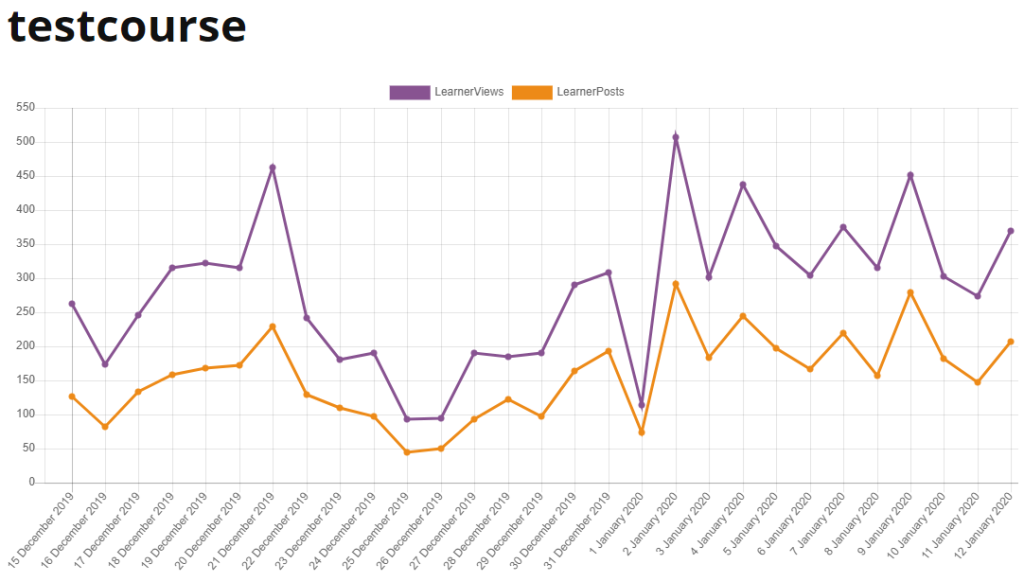

Not sure which of our courses are the most active, or your keen to track the user traffic on a specific course?
Here’s everything you need to know as an administrator to view course traffic, views and posts in Moodle and Totara Learn.
What are course traffic reports?
Course traffic reports are a quick and easy way to view user activity within your courses, over a chosen time period.
The two types of user activity tracked in these reports are views and posts:
- Views: Instances of a user accessing an activity or resource, whether reading or downloading it.
- Posts: Active responses by a user, such as submitting an assignment or responding to a forum discussion post.
This data is generated within the platform’s automatically and displayed in a visual graph for easy analysis.
.png)
Graph Example
Or depending on what you or your team members prefer, the data can also be viewed in a table format.
.png)
Table Example
Key benefits of viewing course traffic reports
- Look at your learner’s overall engagement and behaviour
- Identify activity trends over specific date frames
- See which courses are the most active by comparing data
Viewing course traffic reports
To view course traffic reports in Moodle, follow these simple steps:
1. Navigate to course and click “Action Menu” cog
2. Click “More”
.png)
3. Under Reports, click “Statistics”
3. Choose the Course, Report Type and Time Period in the header bar drop-downs, and click “View”
.png)
To view course traffic reports in Totara Learn, follow these simple steps:
1. Navigate to course and go to the Administration Block.
2. Under Reports, click “Statistics”
.png)
3. Choose the Course, Report Type and Time Period in the header bar drop-downs, and click “View”
Ready for more?
Why not learn more about how you can unlock even more learner behaviour and completion insights across your site, with our smart, on-demand LMS reporting.
Or if you’d like further support using Moodle or Totara Learn our platform experts have a wealth of experience to help you and your team with specific training requirements.
{{cta(‘3e21cb33-5d2d-4b0b-8251-4d3c564afba3′,’justifycenter’)}}